

User roles
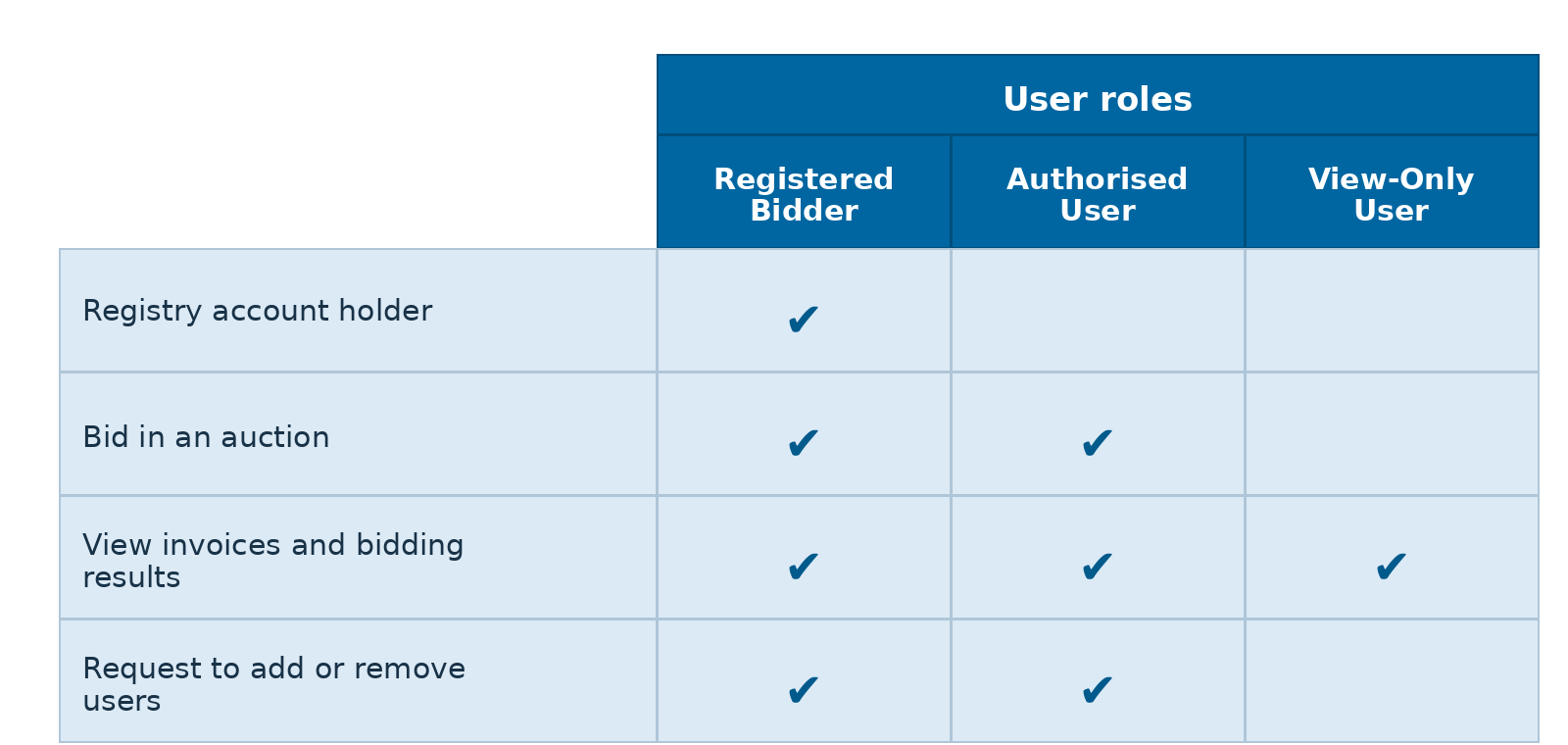
As a user, your responsibilities may differ depending on your role. A user may hold one role or multiple roles. The three types of user roles are:
- Registered Bidder (noting this may be an individual representing the Registered Bidder): The Registered Bidder will be the Registry account holder. Can bid in auctions, view invoices and bidding results and request to add or remove users.
- Authorised User: Can bid in auctions, view invoices and bidding results and request to add or remove users. If the Registered Bidder has appointed a proxy bidder to bid on their behalf at an auction, this proxy (or an individual representing the proxy) will be an Authorised User.
- View-Only User: Can view invoices and bidding results
How to manage users
The Registered Bidder and Authorised User roles can request to add or remove users.
To add a user, contact us at NZETSAuctions@xpansiv.com with the following information:
- Name
- Username
- Company email
- Role to be assigned: Authorised User or View-Only
The user will receive an email with a link to log in. They will use their existing RealMe ID if they have one or create a new one if necessary.
To remove a user, please email us at NZETSAuctions@xpansiv.com with the details of the user to be removed.